In our test, Bielik 11B v3.1 checked the stock, found a substitute for the missing item and placed a correct order in two to three seconds, every time, in Polish and in English. All it needed was a procedure written out step by step in the system prompt, the instructions a program sends the model before the question. With a short, general prompt instead of a procedure, it had no guidance on what to do when the shop refused the order, and its answer did not match what the shop had returned. So Bielik works well as an agent, a program that handles a task in several steps on its own, provided it gets a clear procedure.
This guide shows how to use Bielik through an API, that is, from your own program over the internet, and gives an example from our tests for each piece of advice. The main findings:
- the guidelines built into the model add about a thousand tokens to every request;
- it answers in Polish unless the system prompt asks for English;
- reasoning is off by default and one field turns it on;
- an agent needs a procedure in which every step is one tool call;
- date arithmetic is best left to a tool, and the model reads long documents reliably.
It is written for developers building a chatbot, document search or an agent that works in Polish, and for those who run Bielik themselves. In order: the first call, reasoning, tools, the agent prompt, arithmetic, long documents, your own server, the scope of our tests and the first steps. For another open model we serve through an API, see our post on Arete 27B.
The first call to Bielik through an API
Bielik 11B v3.1, released on 10 November 2026 by the SpeakLeash foundation and ACK Cyfronet AGH under the Apache 2.0 licence, is called through an API the same way as OpenAI's models. It takes an address, a key and the model's name: in Blixild AI these are https://api.blixild.com/v1, the key from your dashboard after sign-in, and bielik-11b-v3.1.
curl https://api.blixild.com/v1/chat/completions \
  -H "Authorization: Bearer YOUR_API_KEY" \
  -H "Content-Type: application/json" \
  -d '{"model": "bielik-11b-v3.1", "messages": [
         {"role": "system", "content": "Answer in English."},
         {"role": "user",
          "content": "What is Bielik? Answer in two sentences."}]}'
The same in Python, with the openai library:
from openai import OpenAI

client = OpenAI(base_url="https://api.blixild.com/v1", api_key="YOUR_API_KEY")
reply = client.chat.completions.create(
    model="bielik-11b-v3.1",
    messages=[
        {"role": "system", "content": "Answer in English."},
        {"role": "user", "content": "What is Bielik? Answer in two sentences."},
    ],
)
print(reply.choices[0].message.content.strip())
Bielik answers in Polish unless the system prompt asks for English, hence the system message. In our tries, English questions with no system prompt got Polish answers 14 times out of 15; with "Answer in English." all 15 came back in English, while "Answer in the language of the question" did not help.
The answer starts with an empty line, hence strip(). The usage field gives the number of tokens, the pieces of words the price is counted in, and a plain "Cześć!" ("Hi!") already counts 1,056 input tokens. These are the model's guidelines, which Bielik's chat template puts before every request: a description of the model, the current date and safety rules. Your own system prompt goes under them. The guidelines help the model with tasks of several steps, so our service keeps them on. They count as input like any other, which at $0.20 per million tokens comes to about $0.0002 a request.
A request and its answer together can be up to 32,768 tokens, and the model takes text only. Bielik is used under the SpeakLeash foundation's terms, which among other things prohibit processing personal data. A question asked this way gets an answer straight away, without reasoning, which has to be asked for separately.
Reasoning on request
For harder tasks Bielik can reason step by step before it answers, according to SpeakLeash also while calling tools. It does not do so by default, so simple questions get their answer straight away and for less. The reasoning_effort field turns reasoning on, with low, medium, high or max. The reasoning comes back in its own field, reasoning_content, and its tokens count as output and toward the max_tokens limit. So leave room, for example 2,048 tokens: a request cut off while reasoning comes back without an answer.
Asked in Polish what 17 × 23 is, with reasoning_effort: low, the model split the product into 17 × 20 and 17 × 3 and answered "17 × 23 wynosi 391." (391), using 328 and 414 output tokens in two tries. In 7 of 12 tries with Polish questions it reasoned in English, and it always answered in Polish, correctly. The level, from low to high, changed the length of the reasoning little.
Reasoning helps with harder questions, but it does not replace a procedure. The overdue-invoices task, which Bielik did right with a procedure, ended with a short prompt and reasoning on at finding the customer: the model did not fetch the invoices with the tool but gave two that were not in the system, numbers 123456 and 789012. Data such as invoices should come from tools, which the next part describes.
Tool calling (function calling)
Tools are functions of your program that the model can ask to run. The program describes them in the tools field in OpenAI's format, the model returns the function's name and arguments in tool_calls, and the program sends the result back in a message with the role tool. Asked in Polish about the weather in Warsaw, with a function pogoda (weather) described, Bielik returned pogoda({"miasto": "Warszawa"}), streamed as well. According to SpeakLeash, on τ²-bench, a test that simulates customer service with tools, version 3.1 scores 16 to 45 percentage points higher than 3.0.
Three settings need care:
- Use a forced call (
tool_choice: "required") only when a tool is really needed. Forced to call one in reply to a plain greeting, the model filled in the arguments with the example from the tool's description and asked for the weather or the time in Kraków ("the city, e.g. Kraków"). - With tools switched off (
tool_choice: "none") the model answers from its own knowledge. Asked then about the current weather, it gave an approximate one instead of saying it could not know, so ask about current data with tools switched on. - Room in
max_tokensprotects calls: a call cut off by the limit comes back as text with a<tool_call>tag, not as a call.
The model card also advises checking a call's arguments before using them, like any outside input. Single calls work well, and a task of several steps also needs the right system prompt.
The system prompt that makes Bielik an agent
An agent works in a loop: it sends the conversation to the model, runs the tools the model asks for and sends their results back, until the model answers in text. Bielik does this well when the system prompt sets the work out in steps. With such a prompt, in every run in Polish and in English, it placed the order with a substitute correctly and gave the hotel limit with the person who approves the trip, and it got the list of overdue invoices, which we tested in Polish only, right in all five runs in our service's setup. Each of these tasks took 2 to 7 seconds. This was the ordering prompt, slightly shortened:
# Role
You place orders in the shop system.

# Definitions
- Available in full: `available` at least the quantity ordered.
- Substitute: the product `find_substitute` returns for an item that isn't
  available in full; it replaces the whole quantity.

# Procedure
1. For each item in the request: call `check_stock` with its SKU.
2. For each item not available in full: call `find_substitute` with its SKU,
   then `check_stock` with the substitute's SKU.
3. Call `place_order` with the client's id and the final items.
4. If `place_order` returns an error, read its message, fix what it asks for
   and call `place_order` again; at most twice.
5. Answer.

# Rules
- Call one tool at a time and wait for its result.
- Never make up data: use only tool results.
- Don't say you did something unless a tool confirmed it.
- No placeholders such as [total]: write the real values.
- Write no text between tool calls: make decisions silently and call the next
  tool. The only text you write is the final answer.

# Answer
- The order number, the items ordered with quantities and prices, each
  substitution and why, each price change, and the total from `place_order`'s
  result.
A short prompt such as "You are a sales assistant, check data with the tools" is enough for the larger Arete 27B. It does not tell Bielik how to get from one step to the next, though, and its answers then drift from the tools' results, as in these Polish runs:
- in an inbox with emails E-1 to E-6, it asked for the text of
WIADOMOSC_001, which did not exist; - asked about a hotel limit, it said it had no tools for that, while it had them;
- it wrote that it had saved an email draft without calling the tool that saves it.
A prompt with a procedure has a few fixed features:
- every step before the answer is one tool call, and a decision, for example "for each item not available in full", is part of the step;
- the request sends
temperature: 0andparallel_tool_calls: false; - arguments are described in words, because a notation such as
save_draft(to: …)is copied out as text instead of calling the tool; - the prompt says what the answer must contain but gives no ready template, which the model fills in word for word, including the salutation left as "Szanowna Pani/Szanowny Panie" (Dear Madam/Sir).
Such a prompt is made to measure for Bielik: Arete 27B, given the same prompt, went into a loop on one task. The procedure is best written by hand, since those written by Bielik and by Arete 27B did worse than one written by hand. One thing, though, needs a tool rather than a prompt.
Date and time arithmetic belongs to tools
Date and time arithmetic is best left to a tool, an ordinary function of your program. In a task to book a one-hour meeting for three people, Bielik with the tool find_meeting_time, which intersects the calendars and returns the earliest free slot, booked the right time, 16:00-17:00, in all six runs, in Polish and in English, in about 1.5 seconds.
Without that tool it read the calendars correctly but worked out the overlap itself and booked 10:30-11:30, although Piotr was busy until 11:00 and Marek from 11:00. Likewise, in an otherwise right Polish answer about the travel policy, it wrote that a trip from 2 to 6 December lasts 4 days rather than 5, so counting days between dates is also best left to a tool.
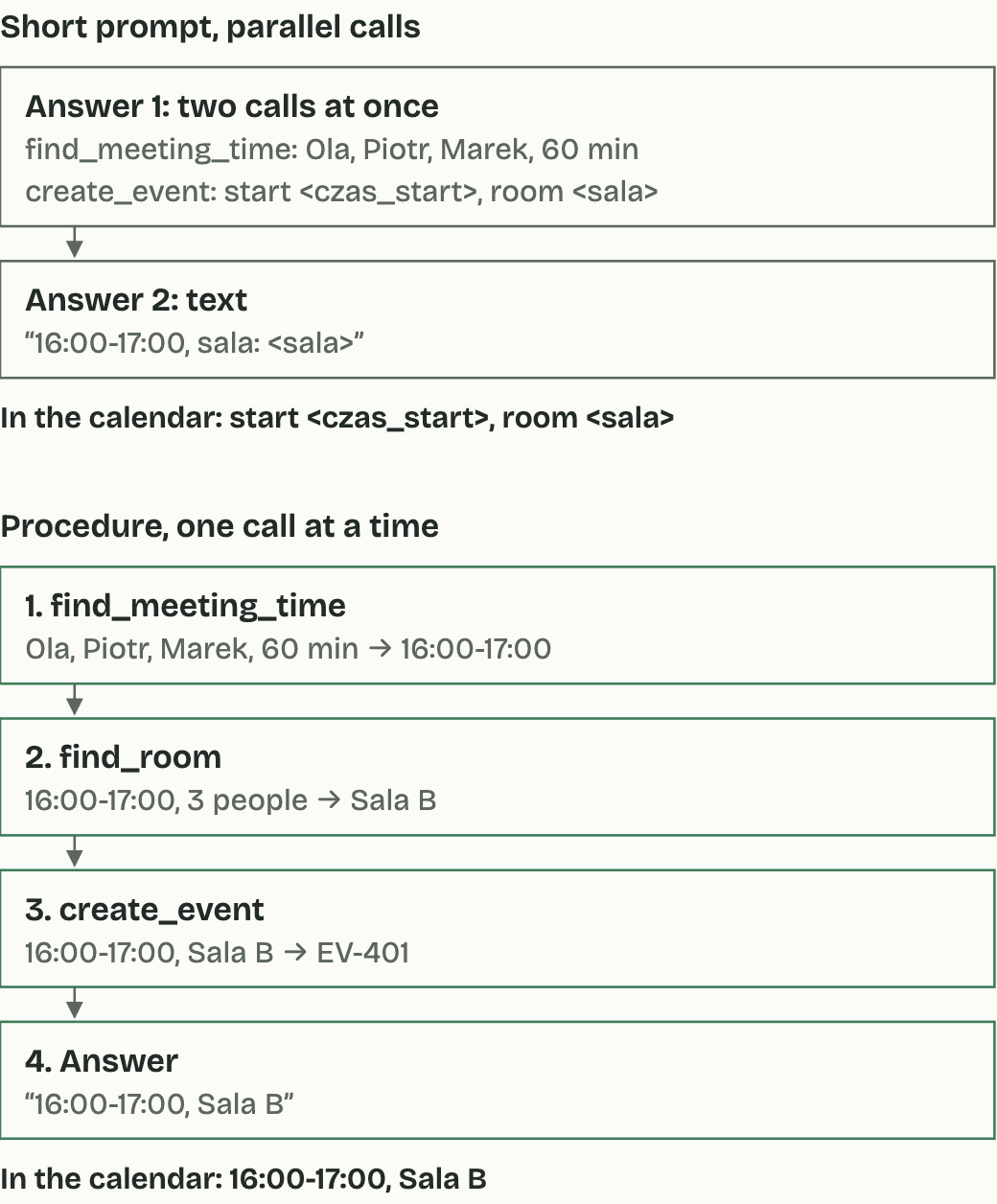
The figure also shows why parallel calls are switched off (parallel_tool_calls: false). When they are allowed, the model with a short prompt asks for a free slot and for the booking in one answer, before it knows the result, so the booking gets the time <czas_start>. With a procedure and one call at a time, each tool gets the previous one's result. Reading long texts, on the other hand, Bielik manages without help.
Long documents up to 32,000 tokens
A long document, such as terms and conditions or a manual, can go into one request together with the question: 30,000 tokens are over 30 pages of text. In our test the document was a company manual full of similar inventory numbers, contracts and names, with three facts hidden at 10, 50 and 90% of its length. Bielik found each of them at 4,000, 16,000 and 30,000 tokens, in Polish and in English, and it often named the section too. Asked about an item the manual did not mention, it always said the document did not give it, rather than giving a number from a nearby paragraph.
The first question about a 30,000-token document got the first token of its answer after 3.9 s, and later questions about the same document after 0.4-0.5 s, because the server keeps the start of a request it has already read. So put the fixed part, the system prompt and the document, first and the question last. A program that checks answers should read them whole: one English answer began by saying the fact was not in the document and then gave it. That is how Bielik works in our service, and those who run it themselves have a few things to set.
Bielik on your own server
The model can be downloaded from Hugging Face and run, for example, in vLLM, a program that serves it through the same API. How to build a whole API with keys and billing around the model is the subject of our guide How to build a self-hosted LLM API. Three settings decided quality and speed for us:
- The model card recommends the parsers from the SpeakLeash foundation's bielik-tools repository. They separate tool calls and reasoning from the answer, and with them every API feature we checked worked. With the parsers built into vLLM, the whole answer could end up in the reasoning field and the text came back empty.
- The helper model Bielik DFlash2 proposes the next pieces of the answer for Bielik to check. On an RTX 5090 it made answers 2.6 times as fast in Polish, to about 290 tokens a second, and 1.7 times as fast in English, to 190, for one request at a time.
- We left the model's guidelines on. With them the agent carried out the whole procedure; without them it stopped after reading the data.
We checked this on one card and one setup, and on other hardware it is worth measuring, as are all the observations from our tests.
What our tests show, and what they don't
A few tests do not tell everything about a model, so it is worth knowing what ours covered. They were six small tasks we wrote ourselves, with made-up data, in Polish and, all but the invoice list, in English: a list of overdue invoices, a question about a travel policy, sorting a support inbox, booking a meeting, an order with a substitute and a search in a long document. Most were repeated three to five times. The results show how Bielik behaves with a given way of asking, and that the behaviour repeats.
With a procedure and a tool for the arithmetic, it got four of the five agent tasks right on every point we checked, in every run, and the one slip was the trip's day count described above. In the support inbox, in Polish, it created every ticket correctly but ended without a summary and without listing the sender who was not a customer; in English it also gave an ordinary fault high priority. This is not a benchmark: other tasks may turn out differently, and the model's general abilities are described by the SpeakLeash foundation's tests on the model card.
Where to start
For chat and questions about documents the first call is enough, because Bielik answers straight away, in Polish, and finds facts in long texts reliably. An agent needs a procedure and tools for the arithmetic, and those who run the model themselves should start with SpeakLeash's parsers and the DFlash2 model. The first steps:
- Sign in at Blixild AI, where an API key and $1 of credit to start are ready at once.
- Send the request from the example above, with the model
bielik-11b-v3.1. - For an agent, write a prompt with a procedure, modelled on the ordering example, and send
temperature: 0andparallel_tool_calls: false. - Hand date and time arithmetic to tools, functions of your program.
- Test the agent on your own tasks, each several times, because a single run says little.
Bielik 11B v3.1 runs in Blixild AI on our RTX 5090 in Poland, at $0.20 per million input tokens and $0.50 per million output tokens. We set up and run a model at a customer's site or in their own cloud account as part of our AI workload hosting.
Sources
- Bielik.ai (2026). Premiera modeli Bielik 11B v3.1, DFlash i rodziny Bielik-One (the release of Bielik 11B v3.1, DFlash and the Bielik-One family). https://www.bielik.ai/blog/premiera-modeli-bielik-11b-v31-dflash-i-rodziny-bielik-one
- SpeakLeash (2026). Bielik-11B-v3.1-Instruct, model card. https://huggingface.co/speakleash/Bielik-11B-v3.1-Instruct
- SpeakLeash (2026). Bielik-11B-v3.1-DFlash2-FP8-Dynamic, model card. https://huggingface.co/speakleash/Bielik-11B-v3.1-DFlash2-FP8-Dynamic
- SpeakLeash (2026). bielik-tools, repository. https://github.com/speakleash/bielik-tools
- SpeakLeash Foundation (2025). Terms of Use of the Bielik model, version 1.1 of 31 July 2025. https://www.bielik.ai/en/terms